
How to share folders and files stored in Google Drive with others directly through Windows and Mac OS
If you use Google Drive to store your folders and files, you'll probably want to share them with fellow workers at some point.
It is simple to share your documents using the web version of Google Drive, but did you know you can also share your folders and files, directly from inside Windows and Mac OS using the Google Drive for Desktop app?
Download Google Drive for Desktop
To do this, you will first need to download, install and sign in to Google Drive For Desktop (previously called Google Drive File Stream GDFS).
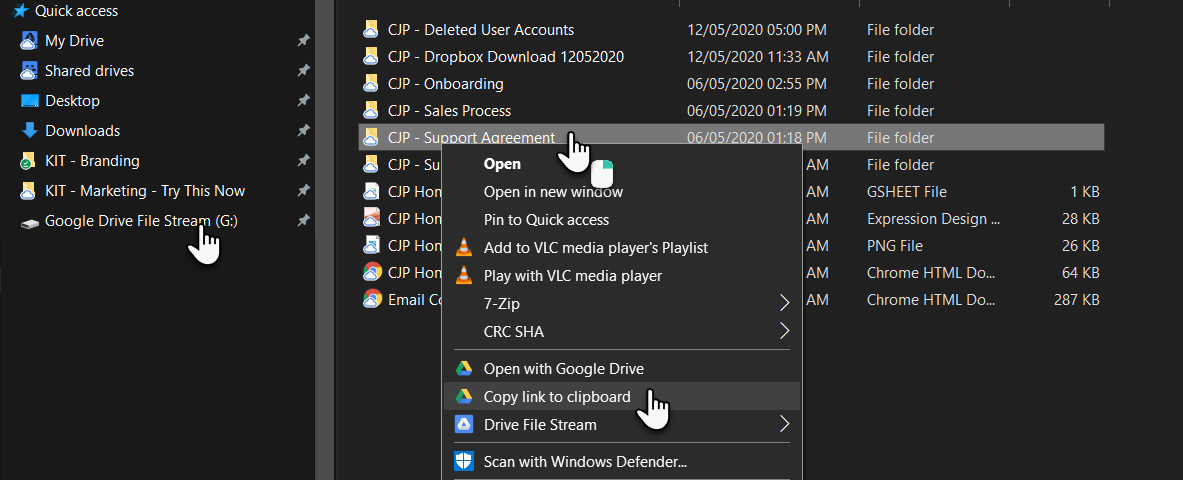
Once you have installed Google Drive for Desktop a new G Drive will be added to your computer letting you have access to your My Drive and Share Drives.
Navigate to the folder or file you want to share.
Right-click on the folder or file and select "Copy link to clipboard".
Now, paste this link into an email, Google Chat or wherever to let others access it.
