
What Is Gemini Spark, and What Does It Mean for Google Workspace Users?
Google announced Gemini Spark and a set of agentic updates at Google I/O '26. Here is what Google Workspace users can expect from the Antigravity framework, how it can boost productivity for internal teams, and what your business should do about it.
Did you catch the Google I/O keynote last night? If you missed it, do not panic. You likely do not have time to sift through developer keynotes—you just want to know how your team members can stop wasting time on administrative tasks and focus on growth.
The biggest takeaway from the announcements is clear: Google Workspace is moving beyond standard chatbots. With the introduction of Gemini Spark, Workspace is evolving into an intelligent ecosystem run by autonomous AI assistants that do the heavy lifting for your team.
What is Gemini Spark?
Gemini Spark is a cloud-based AI agent that executes complex, multi-step workflows entirely in the background. Because it runs directly on Google Cloud, it keeps working for your business even when your team members have their laptops closed or are completely offline.
Spark also builds on Workspace Intelligence, which Google announced at Cloud Next '26 last month. Workspace Intelligence gives Gemini a real-time understanding of your work across Docs, Slides, Gmail, Drive, and Chat. We covered the full set of announcements from Cloud Next '26 in a separate post.
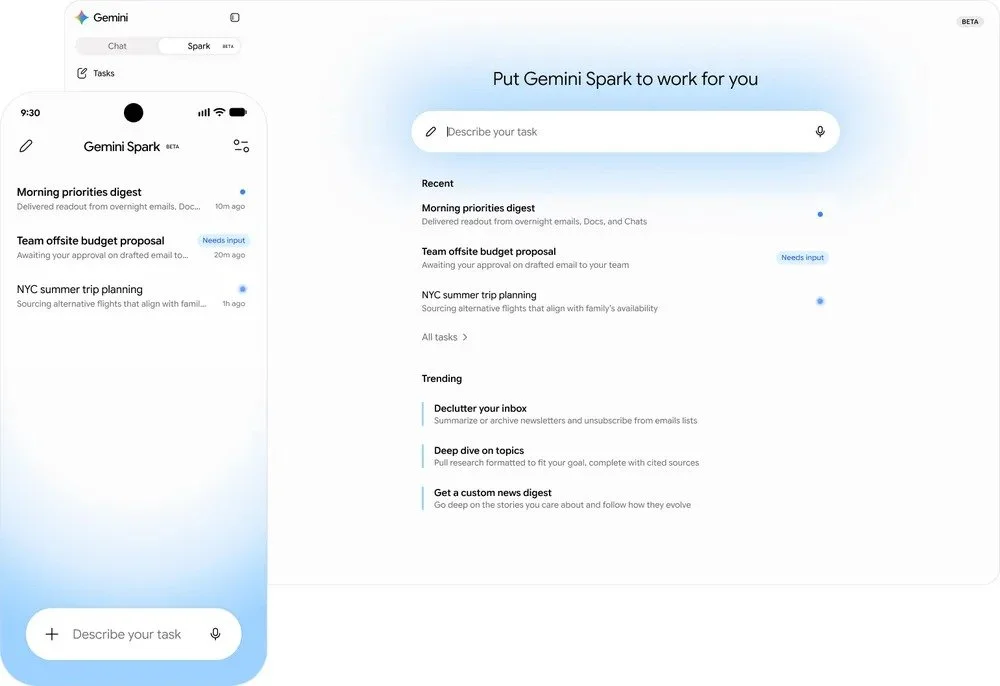
What can Gemini Spark actually do for your business?
Here are some examples of how these new features can boost productivity across different business sizes:
In a Startup: When your team members wear multiple hats, administrative coordination causes massive bottlenecks. You can instruct Spark to monitor a shared project inbox. It will autonomously identify critical client requests, cross-reference timeline documents in Google Sheets, update internal task trackers, and draft a status update—running in the background until it requests your approval to finalise.
In a Scale-Up: For expanding businesses focussed on keeping client relationships flawless, Spark acts as an automated assistant for your account management and sales teams. Spark can work silently to compile comprehensive account histories by pulling data from past communications. If it detects a potential client issue, it automatically structures a retention plan in Google Docs and drafts a tailored response in Gmail, waiting on your team member's explicit confirmation before sending.
In a Small- to Mid-Sized Business: For established companies, maintaining smooth operations without adding manual overhead is vital. Your IT and operations team can set up automated triggers for Spark to monitor internal workflows. If an internal system alert is triggered, Spark can automatically compile an incident log, cross-reference internal procedures, and instantly message the operations manager via Google Chat with an action plan ready to deploy.
When will Gemini Spark be available in Google Workspace?
The rollout is staged. Google has not given Workspace business customers a firm date yet, but the order is clear.
| Group | Availability |
|---|---|
| Trusted Testers | From 19 May 2026 |
| Google AI Ultra subscribers (US) | In the coming weeks from 19 May 2026 |
| Google Workspace business customers (preview via the Gemini app) | "Soon", with no firm date given |
| Gemini desktop app users (local file access, desktop workflows) | Summer 2026 |
For a UK small business on Google Workspace, the row that matters is the preview for business customers via the Gemini app. That is where Spark first reaches your team. Until then, the safest read is to plan for late summer or early autumn 2026 inside Workspace.
Will Gemini Spark act without asking you first?
No, not for high-stakes actions. Google has confirmed Spark asks for your confirmation before sending emails, adding calendar events, or completing purchases. You decide how much autonomy Spark has and on which jobs. You can keep it on a tight leash and review every action. Or you can let it act freely for low-risk jobs like organising your inbox or pulling notes together.
The practical advice is to start tight. When Spark lands in your Workspace, do not give it loose blanket permissions on day one. Pick one job and set it up so Spark drafts but does not send. Watch what it produces for a week, and only widen the leash once you trust its output for that job.
This is the same principle that applies to any AI tool with access to your business data. If you have not already, take a look at why approved access to AI in your business is non-negotiable. The post predates Spark, but the thinking holds up. Every new AI tool with access to your inbox, your files, and your calendar is a new place where governance has to be set deliberately.
Can Gemini Spark work with non-Google tools?
Yes. Spark connects to third-party apps through Model Context Protocol, or MCP. Google's launch partners are Canva, OpenTable, and Instacart, with more named integrations arriving over summer 2026.
The OpenTable and Instacart partnerships are tilted at US consumer use cases. For a UK small business, Canva is the one that lands immediately. If your team uses Canva for social posts, client decks, and quick graphics, Spark will be able to drive those jobs end to end. Draft the brief in your Doc, hand it to Spark, and the Canva asset comes back ready for review.
The MCP question worth raising with Google, and with your IT provider, is which UK small-business tools come next. Xero, HubSpot, Pipedrive, Monday, and Calendly are the obvious ones. Those are the integrations that would make Spark genuinely useful for a UK business, instead of a US consumer product with a UK login.
What else did Google announce?
Spark is the headline, but it is not the only Workspace news. Four other features are worth knowing about.
Voice features in Gmail, Docs, and Keep
Gmail Live lets you search your inbox by voice. Docs Live acts as a voice thought partner that turns spoken ideas into structured drafts. Google Keep can now take a rambling voice note and turn it into a tidy list. These roll out in summer 2026 to Google AI Pro and Ultra subscribers, and in preview to Workspace business customers.
Google Pics
Google Pics is a new image creation and editing app built on Google's Nano Banana model. You can select and edit individual objects inside an image, edit text inside an image, and translate that text while preserving the original font. Multiple people can work on the same image at once on shared canvases. Google Pics is being added to Slides and Drive first. Trusted Testers got it from 19 May 2026, with rollout to Google AI Pro and Ultra subscribers and to Workspace business previews this summer.
AI Inbox updates
Gmail's AI Inbox is now smarter. It can write personalised draft replies, show the relevant Drive file next to a related task, and clear a whole topic with one click. AI Inbox is rolling out to Google AI Plus and Pro subscribers in the US, where it was previously gated to Ultra and Enterprise Plus.
Daily Brief
Daily Brief is a personalised morning summary pulled from your Gmail, Calendar, and Tasks. It started rolling out on 19 May 2026 to Google AI Plus, Pro, and Ultra subscribers in the US.
Frequently asked questions
-
Google has not given a firm UK date for Spark in Workspace. The first wave from 19 May 2026 covers Trusted Testers, with US Google AI Ultra subscribers next. Workspace business customers get a preview "soon" via the Gemini app, with no firm date. Watch the Google Workspace Updates blog for confirmed edition-by-edition rollout dates.
-
Spark runs in Google Cloud under your existing Workspace controls and asks for confirmation before sending emails, adding calendar events, or completing purchases. Your data stays inside Google's Workspace protections. For more on how Google handles Workspace data, our guide to how Google protects your data stored in Google Workspace is the right starting point.
-
The Gemini you use in Docs, Sheets, and Gmail today helps you write, summarise, and analyse when you ask it to. Spark takes a goal and runs multi-step jobs on its own, in the background, including while your laptop is shut. They are the same underlying technology doing very different jobs.
Need help working out what to roll out, and when?
Spark is going to be useful, but only if you set it up properly and pick the right jobs for it to do. The harder questions are which features to enable, what your team policy should look like, and whether your Workspace edition is on the right plan.
If you want help working that out, the next step is to book a video call with Kimbley IT using the form below.
